A blog does not need a complicated theme. It needs readable text, a clean layout, fast loading on a phone, a menu that works, and the freedom to change colours and fonts without writing code. Fortunately, several free themes in the official WordPress directory do exactly that, and they are used by hundreds of thousands of sites.
Below are six free themes that suit blogs, each described with real figures from the WordPress.org directory, what it is best at, and who should skip it. A note on method: these picks are based on public data (active installs, ratings, update history, tags and each theme's own description), not on our own hands-on benchmarks. We tell you what the listings say and how to verify it, and we point out where a number is thin.
How we narrowed it down
- Listed in the official WordPress Theme Directory. The documentation says that every theme there is reviewed by a dedicated team and tested against a wide range of rules for security and quality.
- Free to use for a real blog, not just a trial of a paid theme.
- A meaningful number of active installs and ratings, so the rating is not based on a handful of people.
- Recently maintained, or at least a clear reason if not.
- Works with the block editor you use to write posts.
The numbers at a glance
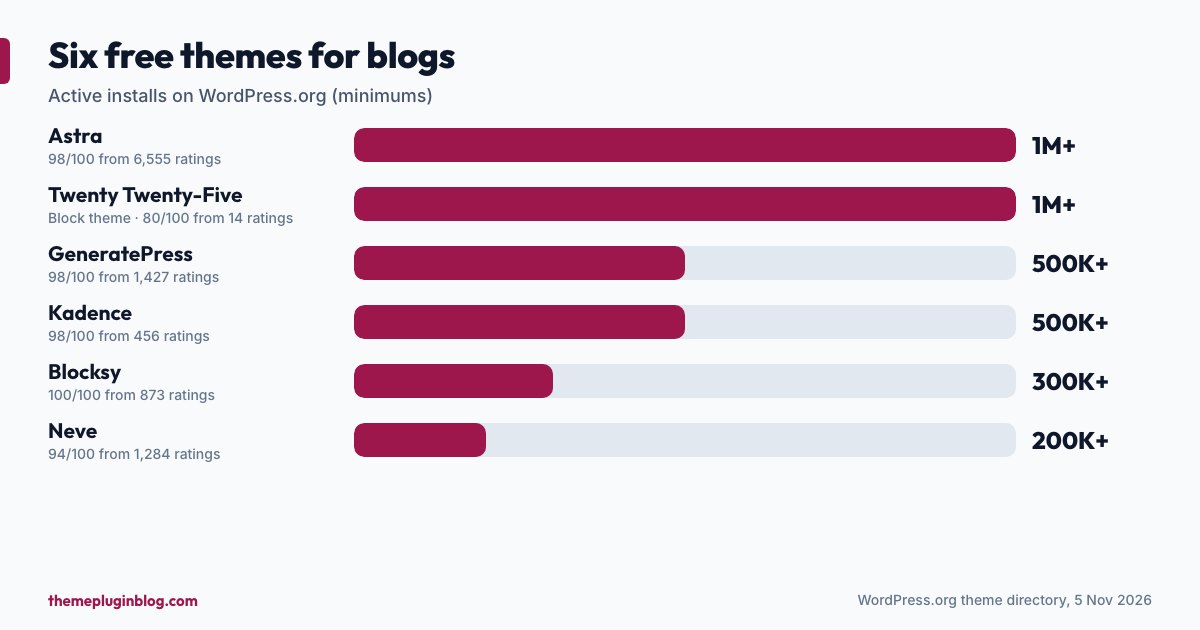
| Theme | Version | Active installs | Rating | Last updated |
|---|---|---|---|---|
| Twenty Twenty-Five | 1.5 | 1,000,000+ | 80/100 (14 ratings) | 20 May 2026 |
| Astra | 4.14.2 | 1,000,000+ | 98/100 (6,555 ratings) | 29 October 2026 |
| Kadence | 1.5.2 | 500,000+ | 98/100 (456 ratings) | 24 July 2026 |
| GeneratePress | 3.6.1 | 500,000+ | 98/100 (1,427 ratings) | 1 December 2025 |
| Blocksy | 2.1.61 | 300,000+ | 100/100 (873 ratings) | 30 October 2026 |
| Neve | 4.2.17 | 200,000+ | 94/100 (1,284 ratings) | 22 October 2026 |
1. Twenty Twenty-Five: the official block theme
Best for: a new blog where you want to design everything inside WordPress with no extra plugins.
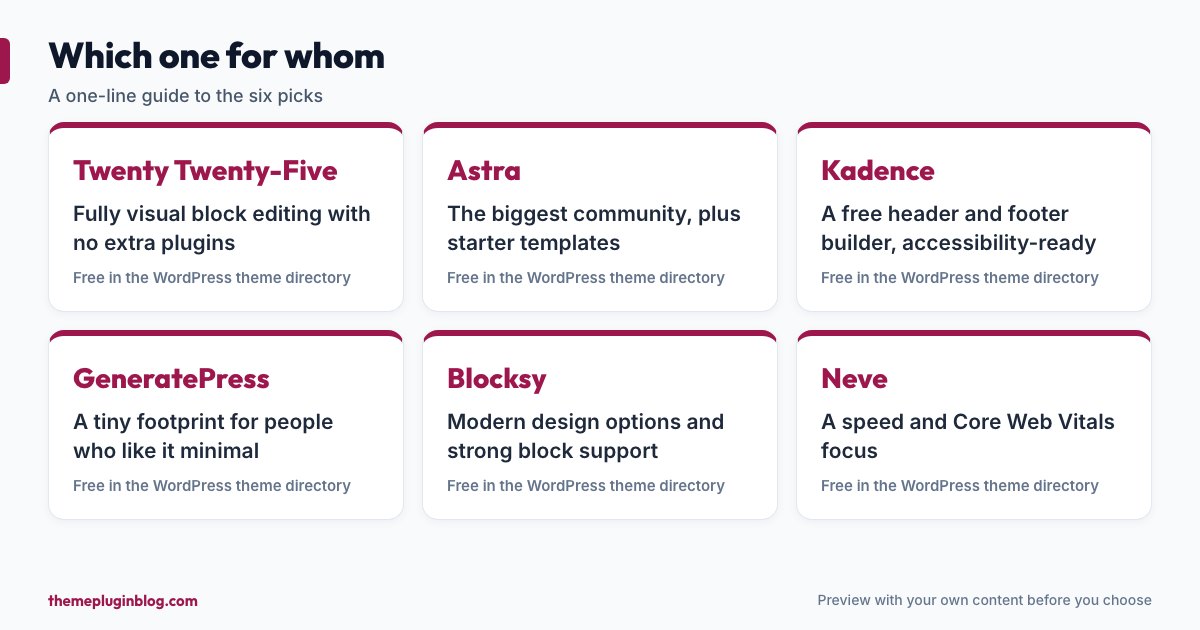
Twenty Twenty-Five is one of WordPress's default themes and a block theme, so the header, footer and templates are edited in the Site Editor. Its directory description says it emphasises simplicity and adaptability, ships with patterns for different page types, and provides templates for blog styles ranging from text-focused to image-heavy layouts. The listing carries the Accessibility ready, Block editor patterns, Block editor styles and Blog tags.
Watch out for: its rating (80 out of 100) comes from only 14 ratings, so treat that number cautiously: a small sample says little. It is plain by design, and it does not come with the one-click demo sites that some other themes offer.
2. Astra: the popular all-rounder
Best for: people who want a huge community, starter templates and plenty of settings.
Astra has more than a million active installs and a rating of 98 out of 100 from 6,555 ratings, the largest number of ratings of the six, and it was updated at the end of October 2026. Its description calls it lightning-fast and highly customisable, and says it works with all the major page builders. It also offers special features and templates for blogs, shops and membership sites. Because it is so widely used, you will find many tutorials and answers online.
Watch out for: the free version is a gateway to a paid upgrade, and some of the nicest starter templates and features are in the paid tier. Take the time to see what the free version includes before committing to a particular demo.
3. Kadence: flexible without a plugin pile
Best for: bloggers who want to design the header and footer visually and keep things light.
Kadence describes itself as a lightweight, full-featured theme for beautiful, fast-loading and accessible sites. The standout is a drag-and-drop header and footer builder (some themes keep this kind of tool for their paid versions), plus a library of starter templates with global colour and font controls. The listing carries the Accessibility ready tag, and it has 500,000+ active installs with a 98 out of 100 rating.
Watch out for: the number of ratings (456) is smaller than the biggest competitors, and the most recent update was in July 2026, so check the changelog and support activity before relying on it for a business site.
4. GeneratePress: the minimalist
Best for: people who value a very small footprint and are happy with a plain starting point.
GeneratePress is built around speed and usability. Its description says that a fresh install adds less than 10 KB (gzipped) to your page size, that it takes full advantage of the block editor, and that it is fully compatible with page builders. It has 500,000+ installs and 98 out of 100 from 1,427 ratings.
Watch out for: its last directory update was on 1 December 2025, so it is the oldest-updated theme in this list. That is not a defect in itself: a deliberately small theme may need fewer changes, and a very high rating suggests users are satisfied, but make sure you are comfortable with the update pace. Its listing points to a premium version on the developer's own website, so check what the free theme includes before you plan around a feature.
5. Blocksy: a strong rating and modern block support
Best for: blogs that want modern design options and good block editor support.
Blocksy has 300,000+ installs and the rating that stands out: 100 out of 100, from 873 ratings. Its description calls it fast and modern, with full compatibility with the block editor and advanced WooCommerce support in case you add a shop later. The listing carries the Accessibility ready, Block editor patterns, Block editor styles and Blog tags, and it was updated at the end of October 2026.
Watch out for: it has fewer installs than Astra, so the community and the number of third-party tutorials are smaller.
6. Neve: lean and speed-focused
Best for: blogs that care about Core Web Vitals and want a straightforward set of options.
Neve's description presents it as an ultra-fast theme designed for performance, SEO and Core Web Vitals, with a lightweight codebase and compatibility with the block editor, popular page builders and WooCommerce. The listing shows the Accessibility ready, Block editor patterns and Block editor styles tags, 200,000+ installs and a rating of 94 out of 100 from 1,284 ratings, with an update in late October 2026.
Watch out for: a theme's speed claims describe the theme in isolation. Your own fonts, images, ads and plugins will decide how your pages really perform.
An honourable mention: Hello Elementor
Hello Elementor has more than a million installs and is updated often (version 3.5.2, early November 2026), but it is not really a blog theme: it is a deliberately bare theme meant to be paired with the Elementor page builder. If you are going to build with Elementor, it is a sensible blank canvas. If you want a blog that you edit with blocks, choose from the six above instead. Our Elementor vs block editor comparison helps with that choice.
How to choose between them
- Decide how you want to edit. If you want everything editable as blocks, start with Twenty Twenty-Five or another block theme. If you like option panels in the Customizer with starter templates, Astra, Kadence, GeneratePress, Blocksy and Neve are the usual suspects.
- Preview with your own content. Use Live Preview (see our guide to installing a theme) and check your longest article, your home page and a phone.
- Look at the free feature list, not just the demo, because demos are often built with paid features.
- Test speed on the demo and on your own page with PageSpeed Insights, comparing against the Core Web Vitals targets: 2.5 seconds or less for Largest Contentful Paint, 200 milliseconds or less for Interaction to Next Paint, and 0.1 or less for Cumulative Layout Shift.
- Pick one and stay with it for a while. Constantly switching themes is more work than any difference between these six.
Set up a blog theme well, whichever you pick
- Keep the reading width comfortable: roughly 60 to 80 characters per line is easy on the eyes.
- Use one or two fonts at most, and check whether the theme loads them from your own server rather than from a third party.
- Choose a sensible text size for phones, at least 16 pixels for body text.
- Set featured-image sizes once, and upload images at a sensible size instead of full camera resolution.
- Remove demo content and unused starter-site plugins after you import a demo.
The bottom line
Any of these six can power a good blog. If you want one answer: choose Twenty Twenty-Five if you want the official, plugin-free block approach; choose Astra if you want the most popular theme and a large community; choose Kadence or Blocksy if you want modern options with accessibility tags; choose GeneratePress or Neve if a small footprint matters most. Preview with your own content, check the facts on the listing, and spend the time you save on your writing.
Sources
All figures are from the WordPress.org theme directory API on 5 November 2026; install counts are minimums. Descriptions are paraphrased from each theme's directory listing.