

"My WordPress site is not sending emails" is one of the most common support questions there is, and it usually has nothing to do with the form, shop or membership plugin you blame. Password reset emails, contact form messages, order confirmations and comment notifications all go through the same WordPress function, wp_mail(), and by default it sends mail from your web server. Mail sent that way is often rejected or filed under spam, because nothing proves to the receiving provider that your server is allowed to send for your domain.
An SMTP plugin fixes that by routing your site's email through a proper email service. This guide explains how it works, what you need to set up, and compares four well-known SMTP plugins using their WordPress.org listings (checked on 5 November 2026). We have not sent test volumes through each, so we describe what the listings say and tell you how to test delivery on your own site.
Why WordPress email goes missing
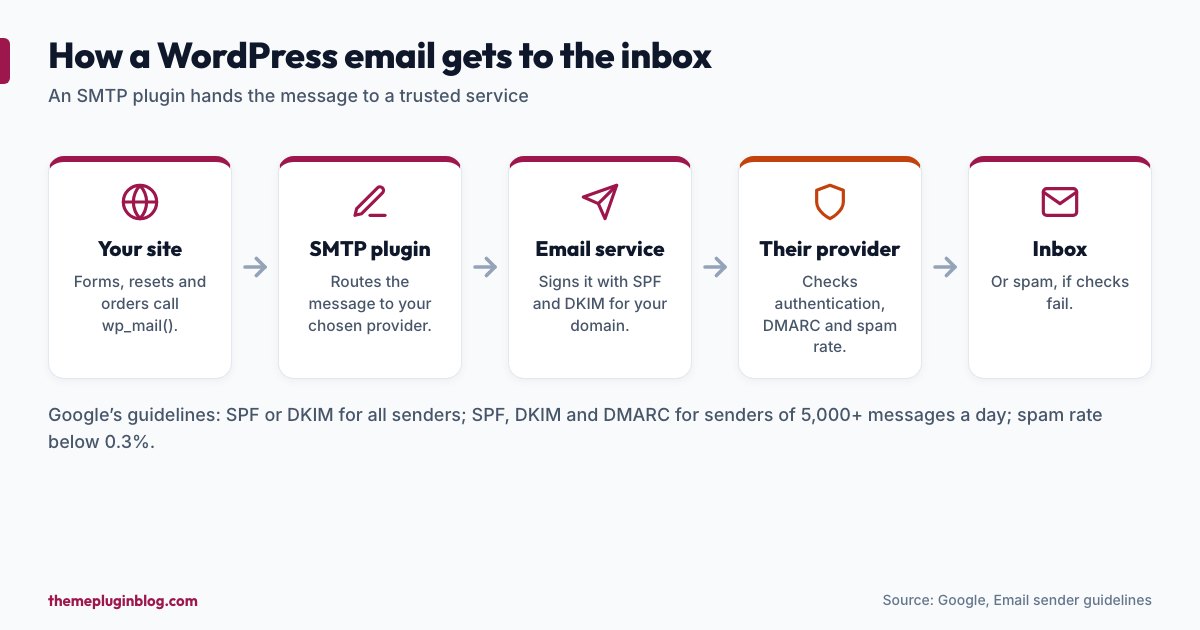
Large mailbox providers filter aggressively. Google's published email sender guidelines set the baseline:
- All senders must set up SPF or DKIM authentication.
- Bulk senders (those sending more than 5,000 messages a day to Gmail accounts) must set up SPF, DKIM and DMARC, with a DMARC-aligned From address, and marketing mail must support one-click unsubscribe.
- Everyone should keep the spam rate low: the baseline is below 0.3%, and the guidance says to aim for below 0.10%.
- Mail must be sent over an encrypted TLS connection.
A small site is unlikely to be a bulk sender, but the lesson applies to all: authenticate your mail, send from your own domain, and send through a service that providers trust.
What an SMTP plugin does
An SMTP plugin does not send mail itself. It reconfigures WordPress so that wp_mail() hands each message to an email provider: a transactional email service (Amazon SES, SendGrid, Mailgun, Postmark, Brevo and others), a mailbox service such as Google Workspace or Microsoft 365, or any SMTP server. Many offer two ways to connect: SMTP (a username and password) or an API connection (a key), and API connections are often more dependable than traditional SMTP on hosts that block outgoing mail ports.
The numbers at a glance
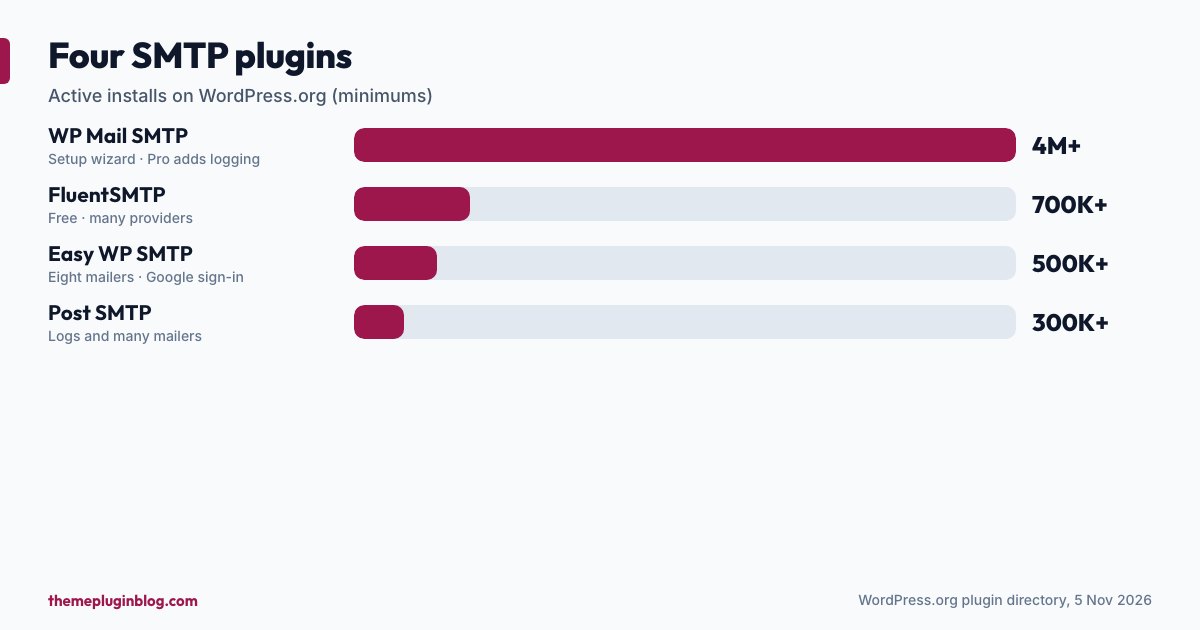
| Plugin | Active installs | Rating | Last updated |
|---|---|---|---|
| WP Mail SMTP | 4,000,000+ | 96/100 (5,211 ratings) | 20 October 2026 |
| FluentSMTP | 700,000+ | 96/100 (412 ratings) | 4 November 2026 |
| Easy WP SMTP | 500,000+ | 92/100 (709 ratings) | 12 August 2026 |
| Post SMTP | 300,000+ | 94/100 (528 ratings) | 24 September 2026 |
The plugins, one by one
WP Mail SMTP: the most widely used
With more than 4 million installs and over 5,000 ratings, WP Mail SMTP is the default answer. Its listing says it fixes deliverability by reconfiguring WordPress to use a proper SMTP provider, with a Setup Wizard and detailed documentation, and that the free version has everything you need to send reliably. The paid Pro version adds email logging, advanced reporting and stats, backup connections (a second provider if the first fails) and email alerts. If you want a well-documented, hand-held setup, start here.
FluentSMTP: free, with a long list of providers
FluentSMTP is a free plugin that, in its own words, routes every wp_mail() call through the email service you choose. Its listing names Gmail, Google Workspace, Amazon SES, SendGrid, Mailgun, Cloudflare Email, Postmark, Brevo, SparkPost, Elastic Email, SMTP2GO, Outlook and Office 365, Zoho, or any SMTP host. It has 700,000+ installs, a 96 out of 100 rating from 412 ratings, and was updated on 4 November 2026. A good pick if you want many provider options without paying for the plugin.
Easy WP SMTP: a Gmail-friendly setup
Easy WP SMTP says it can send all outgoing mail through eight transactional mailers or an SMTP server, and highlights a newer Gmail and Google integration for a quick setup where you sign in to your Google account instead of entering credentials. It also advertises email logs. It has 500,000+ installs and a 92 out of 100 rating; its last update was in August 2026, the oldest in this group, so check the changelog and support activity.
Post SMTP: logs and many mailers
Post SMTP presents itself as a complete email delivery solution with email logs, connecting your site to an SMTP or API mailer: it names Gmail, Microsoft 365, Outlook, Amazon SES, Brevo, Mailgun, SendGrid, Postmark and Zoho Mail among others. It has 300,000+ installs and a 94 out of 100 rating. A good fit if you want to see what your site has been sending.
How to choose
- "I want the best-documented, easiest path": WP Mail SMTP.
- "I want a free plugin and my choice of provider": FluentSMTP.
- "I use Gmail or Google Workspace and want the simplest sign-in": Easy WP SMTP (or any plugin with a Google sign-in option).
- "I want to see logs of what was sent": Post SMTP, or the logging in a paid plan of another plugin.
The plugin matters less than the provider behind it. Whichever plugin you choose, the quality of your delivery comes from the email service, your domain's authentication records, and the content of your messages.
Set it up properly
- Choose an email provider. A transactional service (such as Brevo, Postmark, Amazon SES, SendGrid or Mailgun) or your own mailbox provider. Check its free allowance and limits on its own site.
- Use a From address on your own domain, such as
[email protected], not a free webmail address. Providers distrust mail that claims to be from Gmail but comes from somewhere else. - Add the DNS records your provider asks for. Typically an SPF record (which servers may send for your domain), DKIM records (a cryptographic signature on each message) and, ideally, DMARC (a policy telling providers what to do with mail that fails). Your provider gives exact values; you add them at your domain's DNS host. Keep SPF to a single record: a domain should have one.
- Install one SMTP plugin and run its setup wizard. Choose an API connection if it is offered and your host blocks mail ports.
- Send a test email from the plugin's test tool to two addresses on different providers, and check inbox and spam folders.
- Test your real messages: submit your contact form, trigger a password reset, place a test order if you run a shop.
- Turn on logging and alerts, if available, so a failure does not go unnoticed for weeks.
Common problems
- Test email works, form email does not. The form may use a different From address than the one your provider has authenticated. Set the form's From to your authenticated address and put the visitor's address in Reply-To.
- Everything goes to spam. Check SPF, DKIM and DMARC records, and that SPF lists your provider. Avoid spammy wording, and do not send large attachments.
- Authentication errors. A wrong username, password or API key; or a mailbox provider that requires an app-specific password or a Google sign-in rather than your normal password.
- Two SMTP plugins installed. They conflict. Use one.
- Host blocks outgoing mail ports. Use the provider's API connection, or ask your host which ports are open.
- Sending limits. Free tiers and mailboxes have daily limits. If a busy site hits one, mail will be delayed or rejected.
Privacy and security notes
- Treat provider credentials like passwords. Do not paste API keys into public places. Prefer a key with limited permissions where the provider offers it.
- Logs contain message content. If you log emails, remember they may include personal data: mention it in your privacy policy and set a retention period.
- Your provider sees your email. That is how it works; choose one you trust, and read its terms.
The bottom line
If your WordPress emails are missing, an SMTP plugin plus an authenticated provider is the standard fix. WP Mail SMTP is the best known and best documented, FluentSMTP is a capable free alternative with many provider options, and Easy WP SMTP and Post SMTP are worthwhile alternatives, especially for Google sign-in and logging. Set up SPF, DKIM and DMARC on your domain, send from your own address, test with real messages, and keep an eye on the logs. Fix the plumbing once, and your forms, resets and order emails will actually arrive. If you run forms, see our form plugin comparison.
Sources
Plugin figures are from the WordPress.org plugin API on 5 November 2026; descriptions are paraphrased from each plugin's own listing. Sender requirements are from Google's published guidelines and may change.