Not long ago, if you wanted to design a page that looked custom in WordPress, you installed a page builder. Today the built-in block editor can do a lot of what builders were once needed for, and page builders such as Elementor have kept evolving too. So when you start a new site, which one should you build with?
This guide compares the two on the points that matter in practice: cost, learning curve, design freedom, site-wide templates, portability, performance and long-term maintenance. The facts come from WordPress documentation, the WordPress.org plugin listing and Elementor's own pricing page, checked on 5 November 2026. We have not run performance benchmarks, so we will not pretend to give speed numbers; we will tell you how to test it yourself.
What each one is
The block editor (sometimes called Gutenberg) is part of WordPress itself. Since WordPress 5.0 you write posts and pages with blocks: paragraph, heading, image, columns, group, cover and many more, plus ready-made patterns that arrange blocks into sections. With a block theme, the same blocks also build your header, footer and templates in the Site Editor. It costs nothing and needs no extra plugin.
Elementor is a plugin. Its listing on WordPress.org shows more than 10 million active installs, version 4.3.6, and a rating of 90 out of 100 from over 7,000 ratings. It describes itself as a no-code, drag-and-drop website builder with what it calls the Atomic Editor, and says version 4 introduced "performance-first atomic building blocks". You design on a visual canvas with widgets you drag into place, and you get precise control over spacing, responsive behaviour and effects.
Cost: what is free and what is not
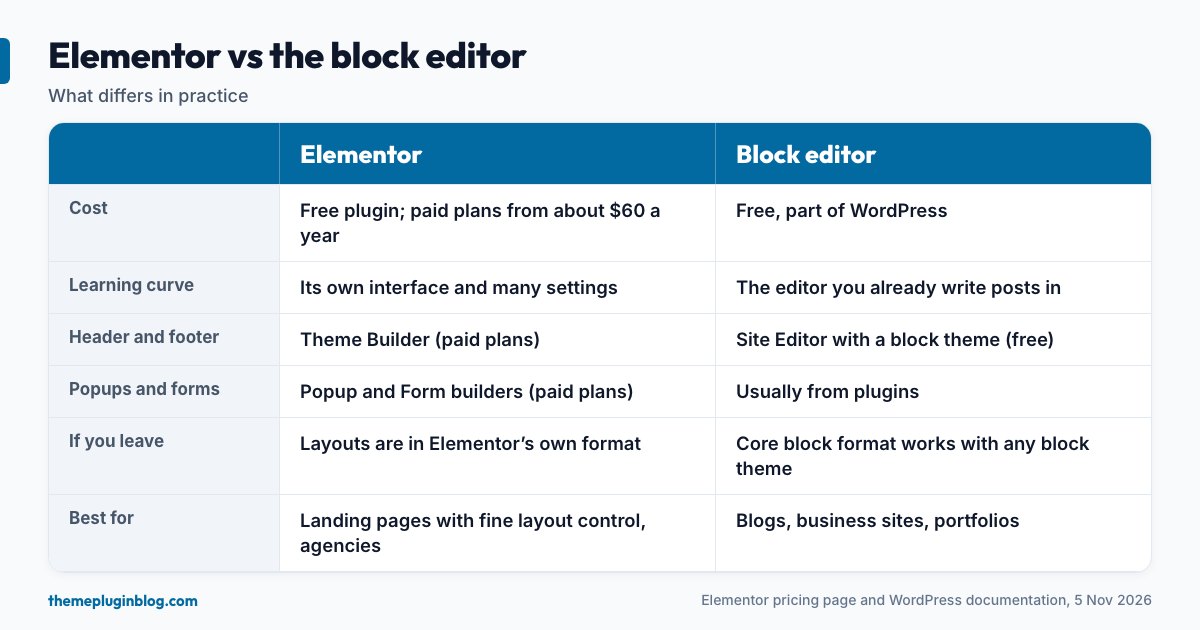
The block editor is free, and so are the Site Editor's templates and patterns when you use a block theme. Elementor has a free version, but its pricing page makes the dividing line clear. The free Editor plugin gives you drag-and-drop tools and a set of free widgets such as Container, Heading, Image, Button and Accordion. It does not include the Theme Builder or the Pro widgets.
The paid plans, as Elementor lists them:
- Essential (one website): adds the Theme Builder, a Form Builder and 57 Pro widgets.
- Advanced Solo, Advanced and Expert (one, three and 25 websites): add a Popup Builder, a WooCommerce builder and 85 Pro widgets.
- One and One Agency: bundle in Elementor's AI credits and extras such as image optimisation, accessibility tools, cookie consent and email deliverability tools. The page notes that Elementor One does not include hosting.
Elementor's page says plans start from about $60 a year (prices exclude taxes and renew at list price), and that the 30-day money-back guarantee applies to annual plans only. If you need headers, footers, popups or forms designed visually, budget for a paid plan. With a block theme, the Site Editor handles headers and footers for free, though dedicated popup and advanced form features usually come from plugins.
Learning curve
The block editor is the one every WordPress user already meets when writing a post, so learning it is learning WordPress itself. It is quite capable, but some precise layout jobs need patience: fine spacing, overlapping elements, complex responsive behaviour. Elementor's visual canvas makes layout work feel direct and gives you more detailed controls, but it brings its own interface, its own vocabulary of widgets and containers, and a lot of settings to learn. For people who build many landing pages, that investment pays off; for someone who writes articles, it is overhead.
Design freedom
This is where builders have traditionally won. Elementor lets you control layout in fine detail: complex grids, backgrounds, effects and different designs per device. The block editor has narrowed the gap, with layout blocks (Group, Columns, Cover and a Grid layout), global styles from theme.json and patterns. For most blogs, business sites and portfolios, blocks are enough. For pixel-precise marketing pages with lots of custom effects, a builder is still quicker.
Site-wide templates: header, footer, post layout
With Elementor, designing your header, footer and single-post layouts is the job of the Theme Builder, which sits in a paid plan. With a block theme, you do the same things in the Site Editor (Appearance → Editor) at no cost: templates, template parts, navigation, and the global styles panel. If site-wide design control is the main reason you are considering Elementor, check whether a block theme already gives you what you need.
Portability: what happens if you leave
This is the least glamorous and often the most important question. Block content is stored in WordPress's own block format, which any block-capable theme can display, so switching themes keeps your content. Elementor stores its layouts in its own data format, which means that if you ever deactivate it or move to another builder, you will not carry the layouts with you; you will need to rebuild them. That is not a reason to avoid it, but it is a cost to be aware of, and it grows with every page you build. Two related points: with a paid plan, Pro features depend on keeping the licence active, and a builder is one more plugin to keep updated, as the update routine describes.
Performance: a question to test, not to assume
You will see confident claims in both directions. The reality is that a lightly built page with either tool can be fast, and a heavy page with either can be slow. Builders add their own scripts, styles and extra layers of page structure, and Elementor says version 4's atomic approach is designed to reduce that overhead. Native blocks have the advantage of being part of WordPress core, with no extra plugin to load. The honest approach is to test your own design.
- Build the same sample page twice, once with each tool, using the same images and text.
- Test both with PageSpeed Insights on mobile.
- Compare the Core Web Vitals against Google's targets: Largest Contentful Paint of 2.5 seconds or less, Interaction to Next Paint of 200 milliseconds or less and Cumulative Layout Shift of 0.1 or less.
Team and workflow
If non-technical colleagues edit the site, ask which tool they will find easier to change without breaking the design. Blocks and patterns limit what can go wrong and are easy for anyone who has written a post. Elementor can lock down templates, but more freedom also means more ways to make a page inconsistent. For agencies that deliver many client sites, a builder's templates and plans for multiple sites can be a productive standard. For a solo publisher, simpler is usually better.
When to choose which
Choose the block editor (with a block theme) when you are building a blog, a magazine, a brochure site or a portfolio; you want the lowest cost and the fewest plugins; you want your content to be easy to move later; or you or your editors write more than they design.
Choose Elementor when you build many landing pages with detailed layouts; you or your clients want a visual canvas with fine control; you need a popup builder, forms and a WooCommerce builder in one tool and are happy to pay for it; or you are an agency that wants one standard tool across clients.
Mix them carefully if you must. Some sites use blocks for posts and a builder for a few landing pages. It works, but you carry the cost of both: two sets of skills, more code loaded on those pages and a dependency on the builder for part of your site.
A simple test before you commit
Spend one hour on a test site. Build the page you care about most (a home page or a landing page) in both tools, with real text. Then ask three questions: Which was faster to build? Which looks right on a phone without extra fiddling? Which would I be happy to hand to a colleague? You will usually know within an hour.
The bottom line
The block editor is free, built into WordPress and ready for most sites, especially with a block theme. Elementor remains a strong choice when you need detailed visual layout control and are prepared to pay for the Pro features and accept the lock-in that comes with any builder. If you are unsure, start with blocks: you can always add a builder later for the pages that truly need one, and you will have kept your content portable in the meantime.
Sources
Checked on 5 November 2026. Plans and prices are as listed by Elementor at that time and change often.