
WordPress powers a large share of the web, which makes it a large target. Most successful attacks are not clever: they are automated scripts that look for a known weakness in an old plugin, a weak password or an exposed login page. A good security plugin cannot make a site unhackable, but it can close many of those easy doors and warn you quickly when something looks wrong.
This guide explains what the main kinds of security plugins do, compares seven well-known ones using real figures from WordPress.org, and shows how to choose and set one up. The picks are based on public data and each plugin's own description, not on penetration tests of our own, so we will tell you what the listings claim and where to check further.
Where the risk actually is
Patchstack's State of WordPress Security in 2026 report gives the clearest picture. In 2025 it counted 11,334 new vulnerabilities in the WordPress ecosystem, 42% more than in 2024. Of those, 91% were in plugins and 9% in themes; WordPress core itself had only six, all rated low priority. Three details from the report matter for how you protect a site:
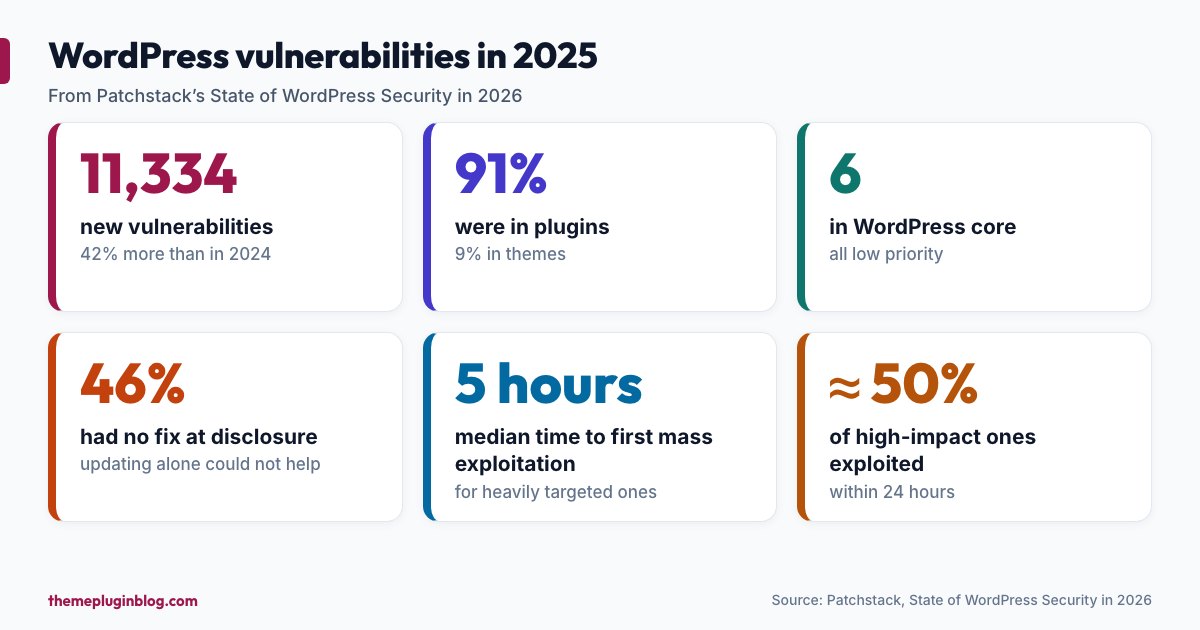
- 46% of the vulnerabilities had no developer fix by the time they were publicly disclosed. Updating alone cannot protect you from those; you need a way to know and a way to block.
- For heavily targeted vulnerabilities, the weighted median time to first mass exploitation was five hours, and about half of high-impact vulnerabilities were exploited within 24 hours.
- Broken access control, where code fails to check who is allowed to do something, was the most exploited category.
The conclusion is not "install a security plugin and relax". It is that you need three layers: prompt updates, protection that works before a patch exists, and detection and recovery when something slips through.
The two kinds of security plugin
Security suites combine a web application firewall, login protection, a malware or file-change scanner and hardening options. Wordfence, All-In-One Security, Kadence Security and Sucuri Security fall mostly into this group. Vulnerability monitors, such as Patchstack and Jetpack Protect, concentrate on one question: does any plugin, theme or version of WordPress on my site have a known vulnerability? You can use one suite plus, if you want, a vulnerability monitor. You should not run two suites at once, because their firewalls and scanners tend to conflict.
The numbers at a glance
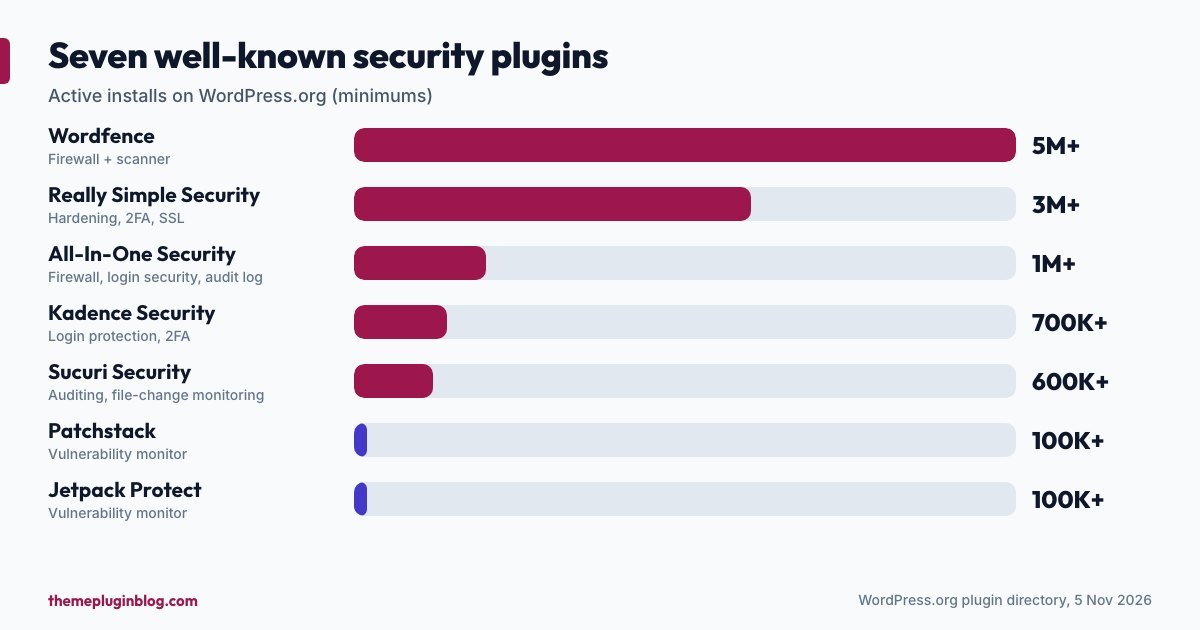
| Plugin | Active installs | Rating | Last updated |
|---|---|---|---|
| Wordfence | 5,000,000+ | 94/100 (5,043 ratings) | 30 September 2026 |
| Really Simple Security | 3,000,000+ | 98/100 (8,870 ratings) | 26 October 2026 |
| All-In-One Security (AIOS) | 1,000,000+ | 94/100 (1,720 ratings) | 30 October 2026 |
| Kadence Security | 700,000+ | 92/100 (3,992 ratings) | 14 October 2026 |
| Sucuri Security | 600,000+ | 84/100 (386 ratings) | 14 October 2026 |
| Patchstack | 100,000+ | 96/100 (62 ratings) | 28 July 2026 |
| Jetpack Protect | 100,000+ | 92/100 (123 ratings) | 12 August 2026 |
Wordfence: the best-known firewall and scanner
Wordfence calls itself the most popular WordPress firewall and security scanner, and its listing says it is backed by a dedicated security research team that turns new exploits into firewall rules and malware signatures. It comes in free and paid versions, and the difference is specific: real-time firewall rules and malware signatures arrive through its Threat Defense Feed for Premium users, while the free version receives them delayed by 30 days. Premium also includes a real-time IP blocklist. Pick it if you want a widely used firewall and scanner and understand that the free tier trades speed for price.
Really Simple Security: simple hardening and two-factor login
Formerly known as Really Simple SSL, this plugin now describes itself as a lightweight, easy-to-use security plugin with WordPress hardening, two-factor authentication, login protection, vulnerability detection and SSL setup. With more than 3 million installs and a 98 out of 100 rating from nearly 9,000 ratings, it is a popular first choice for beginners who want sensible defaults without wading through hundreds of options.
All-In-One Security (AIOS): a beginner-friendly all-rounder
AIOS comes from the same team as the UpdraftPlus backup plugin. Its description lists login security (lock users out after a configurable number of failed attempts, plus two-factor authentication), file and database security (notices of file changes and blocking access to key files), a firewall with PHP and .htaccess rules, spam prevention and an audit log that shows when a plugin or theme is added, removed or updated. A useful touch for newcomers: features are labelled basic, intermediate and advanced, so you can start with the safe ones and add more as you learn.
Kadence Security: login protection and a network of shared blocks
This is the plugin formerly known as iThemes Security and then Solid Security; the WordPress.org listing now carries the Kadence Security name. Its description emphasises password rules, two-factor authentication and brute-force protection, including a brute-force protection network drawn from nearly a million sites that shares blocked attackers. It also says that setup takes under 10 minutes, offers security templates for different types of site, and has a Pro version that integrates Patchstack's vulnerability protection.
Sucuri Security: auditing and monitoring
Sucuri's free plugin concentrates on visibility: a security activity audit log, file integrity monitoring that detects unauthorised changes, remote malware scanning, blocklist monitoring (an alert if a major service blocklists your site), hardening options and help with post-hack recovery. Its rating (84 out of 100) comes from a smaller number of ratings than the others, so read recent reviews. As with any vendor that also sells services, check which features need a paid Sucuri plan before assuming the plugin alone covers your needs.
Patchstack and Jetpack Protect: vulnerability monitors
Patchstack identifies known vulnerabilities in WordPress core, plugins and themes, using data from a community of security researchers. Its free version includes an early warning of up to 48 hours for new vulnerabilities, can automatically update vulnerable software, and provides remote update management and reports. Jetpack Protect is a free plugin from Automattic that runs daily vulnerability scans against the WPScan database of more than 60,000 vulnerabilities, with malware scanning and one-click fixes available in an upgrade. Both are useful as an early-warning layer. A small point to check: at the time of writing, both listings show "tested up to" WordPress 7.0.8, while the current release is 7.1.4. That is often just a lag between releases, but a quick look at each plugin's support forum is sensible.
How to choose
- "I want one plugin and sensible defaults": Really Simple Security or All-In-One Security.
- "I want a well-known firewall and scanner": Wordfence, remembering that the free version's rules arrive 30 days late.
- "My biggest worry is people guessing logins": Kadence Security, or any suite with two-factor authentication and login limits.
- "I want to know what changed on my site": a suite with an audit log and file-change monitoring, such as AIOS or Sucuri.
- "I just want alerts about vulnerable plugins": Patchstack or Jetpack Protect, alongside a suite if you also want a firewall.
Also check what your host provides. Many hosts run their own firewall or malware scanning, and some sites sit behind a service such as Cloudflare. Plugins and host-level protection can complement each other, but check for overlap before turning on duplicate features.
Set it up properly
- Back up first, and keep a copy off the server.
- Install one security suite and run its setup wizard.
- Turn on two-factor authentication for every administrator account. The official hardening guide recommends strong passwords and two-step authentication as the defence against brute-force attacks.
- Limit login attempts, but make sure you know how to get back in: keep your FTP or file-manager access, and note how to disable the plugin by renaming its folder.
- Send alerts to an email you actually read.
- Run a first scan and read the results calmly; some warnings are informational.
- Re-test the site afterwards: login, forms, checkout. Aggressive firewall rules can sometimes block legitimate actions.
What a plugin cannot do for you
The WordPress hardening guide lists measures no plugin replaces: run the latest WordPress and update plugins promptly (see our safe update routine), delete plugins you do not use, avoid an administrator account called "admin", use correct file permissions (755 for directories and 644 for files are the guide's recommendation), protect wp-config.php, require HTTPS for the dashboard and keep regular backups. It also suggests adding define( 'DISALLOW_FILE_EDIT', true ); to wp-config.php, which removes the built-in theme and plugin file editors, so an attacker who reaches your dashboard cannot rewrite code from there. The guide is candid that this does not stop attackers from uploading malicious files, which is why layers matter.
If you think you have been hacked
- Do not panic and do not delete things at random. Take a backup of the current state for investigation.
- Change every password: WordPress admins, hosting, database, FTP and email. Check Users for administrators you do not recognise.
- Run your security plugin's scan, and ask your host whether they can scan the account.
- Reinstall WordPress core, plugins and themes from fresh, trusted copies rather than cleaning individual files.
- Restore from a clean backup if you have one that predates the problem.
- Find out how they got in (usually an outdated plugin or a weak password), and fix that first.
The bottom line
A security plugin is one layer, not a force field. The most effective protections are free and dull: updates applied quickly, strong unique passwords with two-factor login, fewer plugins, regular off-site backups and a clear plan for recovery. Add one security suite for the firewall, scanning and login protection, optionally a vulnerability monitor for early warnings, and you will be ahead of most sites on the internet.
Sources
Statistics are from Patchstack's published report; plugin figures are from the WordPress.org plugin API on 5 November 2026 and change over time. Plugin features are paraphrased from each plugin's own listing.
- Patchstack: State of WordPress Security in 2026
- WordPress Advanced Administration Handbook: Hardening WordPress
- Wordfence on WordPress.org
- Really Simple Security on WordPress.org
- All-In-One Security on WordPress.org
- Kadence Security on WordPress.org
- Sucuri Security on WordPress.org
- Patchstack on WordPress.org
- Jetpack Protect on WordPress.org